Pages

Showing posts with label math. Show all posts

Tuesday, December 03, 2013

Fun Living Math!

Someone just shared a link on Facebook to the Arithmetic Village website. The author, Kimberly Moore, wrote some fun little books to introduce arithmetic concepts to children, and she is now offering them as a free download! She also has some cool printables to go along with them.  Here's how you get the download:

  1. Go to her online store. Click on the "Free for download" link. You will be asked to sign up for her newsletter.
  2. You will get two emails - a "welcome" and a "confirm your subscription" message. Confirm your subscription; you'll get a "subscription confirmed" email.
  3. In a little while, you will receive another email with the link to download your files. 
I know this seems a little silly, but all the emails you receive are titled "Arithmetic Village Free Downloads," and it can be a little confusing.

I wasn't asked to review the books, just thought they looked like a nice way to "play math." Check them out!

Thursday, November 14, 2013

MEP Math - Week 1, Day 2

We're on day 2 of MEP, year 1, and there is another poster with more stories to tell! (PDF lesson plans here, poster here; we're on week 1, day 2, poster 10.)


The Mouse Meeting - Belling the Cat, another fable from Aesop

The mice once called a meeting to decide on a plan to free themselves of their enemy, the Cat. At least they wished to find some way of knowing when she was coming, so they might have time to run away. Indeed, something had to be done, for they lived in such constant fear of  their claws that they hardly dared stir from the dens by night or day.

Many plans were discussed, but none of these was thought good enough. At last a very young Mouse got up and said:

"I have a plan that seems very simple, but I know it will be successful, All we have to do is hang a bell about the Cat's neck. When we hear the bell ringing we will know immediately that our enemy is coming."

All the mice were much surprised that they had not thought of such a plan before. But in the midst of the rejoicing over their good fortune, an old Mouse arose and said:

"I will say that the plan of the young Mouse is very good. But let me ask one question: Who will bell the cat?"

It is one thing to say that something should be done, but quite another matter to do it.


The wolf and seven little kids - A Grimm Fairy Tale; I'm not going to post it here, because it's rather long, but the link takes you to a page where you can read it or print it.


The wedding of Cricket and Mouse - I have nothing for this one. Not a clue. Guess we'll be making it up.


Little pig and the wolves - One begins to wonder if the person thinking up these stories remembers things incorrectly, or if their parents made up their own versions of folk tales. The only thing I could come up with for this one is The Three Little Pigs, an English folk tale. If you know of a story about a pack of wolves chasing one pig up a tree, please tell me! This is another longer tale, so I won't put the text here, but the link takes you to two different versions of the story.


The ugly duckling - We know the story of the Ugly Duckling, who turns out to be a swan! This tale comes from Anderson's fairy tales, and can be found here.


In the lesson, you tell the story about each picture, and then count the number of living creatures and put a dot in a box for each one. If you look at the poster, you'll see the boxes for the dots. I tell shortened versions of the stories, because the lesson would take much too long for my busy little man if we read the long versions every time. I do find it helpful to know the stories, though, because it's much easier to summarize than to make it up myself.

Wednesday, November 13, 2013

MEP Math, Year 1, Lesson 1

I'm using Mathematical Enhancement Programme (MEP) Math with Isaac this year, because I've heard such good things about it from other Charlotte Mason educators. Also, it's free - all the files can be downloaded and printed, or viewed electronically if you prefer. I would recommend printing the workbook for your student, but you could easily use the lesson plans on a tablet or computer. I did look at this when the girls were younger, but thought it was confusing. I looked at it again a few months ago, and it's not terribly confusing. I don't know if I'm more comfortable teaching math now, or what, but it seems very do-able, so here we are.

Anyhoo, in the very first lesson, we were instructed to look at a poster number 9 with five pictures, and tell the story about each picture. The links are to PDF files, in case you'd like to see what I'm talking about. If we weren't familiar with the stories, we were supposed to make them up. I have a hard time with making things up. I like to have All The Things ready to go, and can get stuck if I don't have them. I decided to look up the stories, and post them for other people who might have the same issue. I found them all except "The carrot comes home." I have never heard of a story like that. If you know it, and could link me to a book or online story, I would really appreciate it. My curiosity has been piqued.


The Little Cockerel's Golden Penny - Fable from Aesop, also called "The Cock and the Pearl" or "The Cock and the Jewel."

A Cock was busily scratching and scraping about to find something to eat for himself and his family, when he happened to turn up a precious jewel that had been lost by its owner.

"Aha!" said the Cock. "No doubt you are very costly and he who lost you would give a great deal to find you. But as for me, I would choose a single grain of barleycorn before all the jewels in the world."

Precious things are without value to those who cannot prize them.


Two Stubborn Goats - "The Two Goats" in Milo Winter's version:

Two Goats, frisking gayly on the rocky steeps of a mountain valley, chanced to meet, one on each side of a deep chasm through which poured a mighty mountain torrent. The trunk of a fallen tree formed the only means of crossing the chasm, and on this not even two squirrels could have passed each other in safety. The narrow path would have made the bravest tremble. Not so our Goats. Their pride would not permit either to stand aside for the other.

One set her foot on the log. The other did likewise. In the middle they met horn to horn. Neither would give way, and so they both fell, to be swept away by the roaring torrent below.
It is better to yield than to come to misfortune through stubbornness.


The Three Rabbits - This seems to be a Turkish tale, and I found a nice retelling, which I've linked. I'm not posting the entire thing because it's done by a storyteller, and I don't want to infringe on a copyright. He has a button on the page to print the story. He also has a version of the Two Goats story.


The Bird with Borrowed Feathers - Another fable from Aesop, "The Vain Jackdaw and His Borrowed Feathers:"

A Jackdaw chanced to fly over the garden of the King's palace. There he saw with much wonder and envy a flock of royal Peacocks in all the glory of their splendid plumage.

Now the black Jackdaw was not a very handsome bird, nor very refined in manner. Yet he imagined that all he needed to make himself fit for the society of the Peacocks was a dress like theirs. So he picked up some castoff feathers of the Peacocks and stuck them among his own black plumes.

Dressed in his borrowed finery he strutted loftily among the birds of his own kind. Then he flew down into the garden among the Peacocks. But they soon saw who he was. Angry at the cheat, they flew at him, plucking away the borrowed feathers and also some of his own.

The poor Jackdaw returned sadly to his former companions. There another unpleasant surprise awaited him. They had not forgotten his superior airs toward them, and, to punish him, they drove him away with a rain of pecks and jeers.

Borrowed feathers do not make fine birds.


All the fables come from Milo Winter's version of Aesop, which is what I have at home and have used with my children. The website I linked has fables in English, Latin and Greek. Isn't that cool? You could have a lot of fun with that, if you were learning Latin and Greek.

Thursday, November 07, 2013

REVIEW: IXL.com


It's no secret that I'm always looking for ways to help my children practice math skills. I have one in particular who can use all the practice she can get. So, I was excited to have the opportunity to review IXL.

IXL.com is a website that offers math practice for PreK through 12th grade, and language arts for 2nd-4th grade (more to come). They are aligned with Common Core State Standards, as well as individual state standards, if you need that for your homeschool. We received a 1-year membership for the purpose of this review, and all three of my children used it: kindergarten, 7th grade and 8th grade.

IXL's website offers practice problems that remind me of an electronic workbook. The problems are more like math drills than games. There isn't much there to distract students, which is good. They have skills listed out separately, so it's easy to have students work on specific skills. Students can work at any level, so if they are advanced they can work ahead and if they need to catch up they can use previous levels. There is also an iPad app, free to download, and you can log into your IXL account for mobile practice. It's perfect for using while waiting for siblings at activities or long car rides.

Students earn little rewards for meeting goals within the program, such as practicing for a certain amount of time or mastering skills. This feature wasn't a huge draw for my kids, but could make it more fun, working toward a goal to uncover the next picture. Here is what Isaac's board looks like:


Isaac did all right with IXL. He wasn't a huge fan;  it wasn't terribly interesting to him. One issue I had with it for him was that although there was an audio option so he could hear the instructions, if he answered incorrectly, the explanation wasn't able to be read. He could hear the correct answer, but since he's not reading yet, he couldn't read how to solve the problem correctly. I had to sit with him while he practiced, which was fine, except that I'd prefer something he could do independently so I could be free to work with the girls.

The girls were better able to utilize IXL. I didn't think they'd like it much, but they both said while it wasn't the most fun they'd ever had, they felt it was effective. I had to laugh, because Emma decided to try some of the language arts, and she didn't do very well. I was quite concerned when I looked at the material, because the questions she missed were so easy. She's in 8th grade, and IXL currently has language arts for 2nd-4th grades.  However, when I tried them myself, I missed quite a few because I didn't read the instructions carefully for each one. That was a good lesson for us both - we need to read the actual instructions and not assume we know what we're supposed to do!

As the parent, I received weekly progress reports for each student, showing both the amount of time they spent practicing and how well they were doing. I did like that the kids were practicing problems written in the same style they might see on their tests we do each year. They don't take the same end-of-grade tests used in public schools, but we do have to administer yearly tests in North Carolina, and sometimes they've struggled when questions are worded differently than they've seen in the curriculum we use. It's good for them to experience different ways of learning the same information.

In summary, IXL offers a solid, basic math practice program that allows children to practice all the necessary skills according to state standards. I plan to continue to have my girls use it as necessary, particularly since I can put the app on their iPads. It will reinforce what they're learning, and perhaps fill in any holes they might have in their math knowledge. I will probably not have Isaac continue. He doesn't need the extra math practice yet. I could see this being a great fit for folks using a traditional, textbook-style math curriculum, and for afterschoolers. 


IXL offers family memberships to their website for $9.99 per month or $79 per year, for one student using math. You can add additional children to your family membership for $2 per month or $20 per year, and you can add language arts for $50 total for the year. So, for my three children, we'd pay $169 per year for all of them to have access to math and language arts. Make sense?

Click to read more reviews from the Schoolhouse Crew!


Tuesday, October 01, 2013

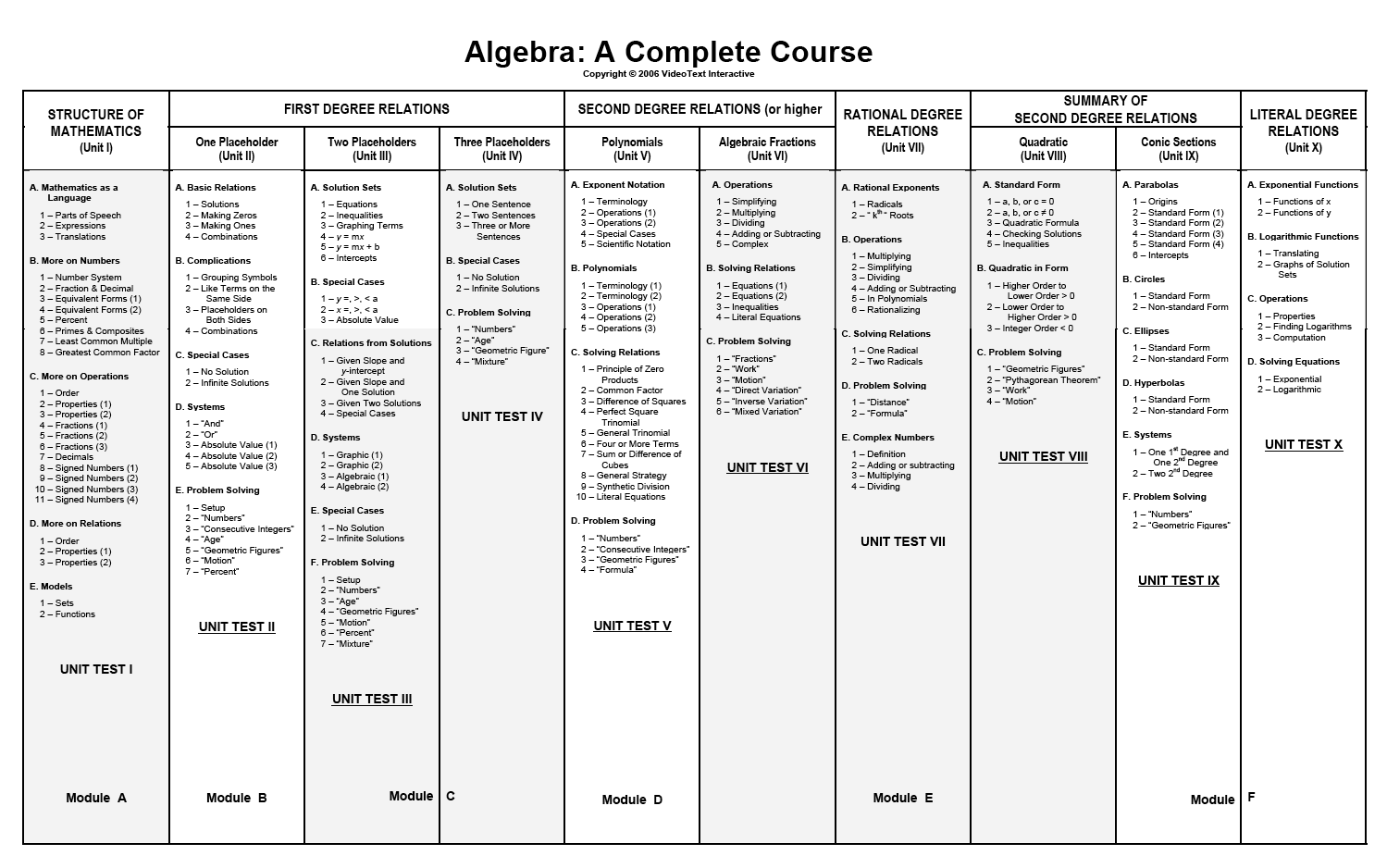
REVIEW: VideoText Algebra

Do you struggle with teaching math in your homeschool? I do. I hate teaching math. There. I said it. Actually, anyone who knows me knows this, as I have been searching for the perfect curriculum that would solve all our math woes since my oldest child was in 1st grade (she's in 8th this year). I can do math, most of the time, but I don't teach it well. I have one way that I understand it, and if the children don't understand it that way, we find ourselves at an impasse. This has not made for a pleasant experience for any of us. I've learned (finally) that I have one child who learns math a little differently than your average bear, and I need to figure out how to help her with it. I've decided that THIS WILL BE THE YEAR in which we conquer the math monster.

We've been using another program that teaches on the computer, and while my children liked it, I could see that it wasn't giving them enough mathematical depth, if that makes any sense. When I received the opportunity to review Algebra: A Complete Course from VideoText Interactive, I jumped on it. I watched this sample video and learned WHY dividing fractions works the way it does, and I was sold. I did learn to divide fractions when I was in school, of course; I knew how, but never why. It might sound silly, but this was a huge revelation for me!

Each concept is taught through a video lesson, during which the student watches the instructor talking, as well as watching visuals of the concepts as they work through them, which replaces watching a teacher write on a blackboard. It's recommended that you sit and watch at least the first few videos with your student, stopping frequently to ask them about what they're learning and talk with them to be sure they understand. That, right there, is key - having your student narrate what they're learning back to you. Brilliant! I have been watching the videos with the girls when I can, but often I'm hanging out with my 6 year old, so the girls come to me when they are working through their problems for each lesson and we talk then. Each video lesson is 5-10 minutes long, so the lessons themselves are short - a perfect fit for our Charlotte Mason homeschool.


This is not a typical algebra program. When a student completes Algebra: A Complete Course, they can claim credits for Pre-Algebra, Algebra I and Algebra II. They do not use a traditional scope & sequence for teaching the subject; they teach with a mastery approach, going through and re-teaching arithmetic concepts and explaining why things work the way they do, then going on to apply those concepts to algebra.


The folks at Videotext recommend this course in general for 8th or 9th grade students, but if you feel your child is ready at a younger age, you can certainly start them in this program. Take a look at this video to hear Tom Clark, author of the program, explain how to know if your child is ready.

When you log in as the instructor, you have the option to print entire files for each unit, or print them out per lesson. It really depends on how you organize your students. I have one friend who gives her children binders with their daily work, so she puts their worktext pages in that binder, but prints out the course notes and bound them separately. I don't have daily work binders, so I chose to print all the course notes for the entire program and put them in one book, and print out the worktext for Unit 1 and put that in a binder by itself.

Instructor Screen
When students log in, this is what they see:


Obviously, they are not privy to handy things like the answer key. They have links to the video lessons, and the teacher is responsible for printing out any required documents for them. One thing I like is that each time they click on a new lesson, they receive a prompt that tells them to be sure they've taken the quiz for the previous lesson before they begin. That's a handy little reminder for both student and mom!

I'm not going to lie: this has been a challenging program for us. I am faced every day with how much math I've forgotten. I thought pre-algebra would be a breeze, but I'm constantly referring to the answer key to figure out how the questions should be answered, or how something is supposed to work. When they say they don't teach any shortcuts, they aren't kidding, and apparently I learned a lot of them. I am learning things from the ground up, just like they are. I think the best approach is going to be for me to watch each lesson the night before and work through some of the problems. Hopefully by doing that I will be able to help them when they have questions, and sound like I know what I'm talking about, rather than figuring it out on the spot.

My oldest child, who doesn't like math much, is being forced to think, and that is a GOOD THING. I can already tell she's learning a lot from this program. She said to me the other day, "I guess that's why they made me learn all that fraction stuff, eh?" I do think she enjoys the work, because she's finally learning the "why" of math. She never saw the point before, and now I think she's beginning to see.

My younger daughter likes this program very much, because it IS challenging. She likes math, and enjoys working through the problems. I actually had her skip a year in our other math program, because it was too easy, and I knew she'd pick up whatever she needed to know from Videotext. That has proved to be true. Today she learned how to factor, and she picked right up on it and finished her work. She did ask me if it's really necessary to go through all those steps just to simplify a fraction. I told her it is!

This really is an excellent math program, and we're going to continue on with it. It's available from VideoText Interactive for $299, which is a great price for what is essentially three years of math instruction.

Click to read more reviews from the Schoolhouse Crew on VideoText Interactive's Algebra program, as well as their Geometry program.


Wednesday, May 22, 2013

REVIEW - Educational Dice Bag from Joyce Herzog


I recently received the Educational Dice Bag from Joyce Herzog to review through the Schoolhouse Review Crew. I'm always interested in new (at least to me) educational products, and my kids LOVE to play games (don't they all?), so this was right up our alley.


Joyce Herzog is an educator with 25 years experience teaching elementary and learning disabled students in both private and public schools, and has served homeschoolers for more than 25 years through her speaking engagements, the books she's authored, and consultations. She wants to help students learn as they learn best, according to their individual learning style.

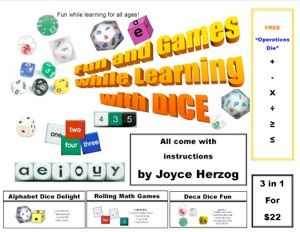
The Educational Dice Bag comes with three sets of dice: Alphabet Dice Delight, which includes a 30-sided alphabet die (all the letters plus four "wild" spaces) and a vowel die (AEIOUY); Rolling Math Games, which includes 1 die with numbers, one die with number words, and two dice with colored dots; and Deca Dice Math Games, which includes 1 deca die with numbers, 1 dotted deca die, 1 number word deca die, and 1 double deca die (a die within a die - so cool!).  There is also a math operations die. Each bag contains instructions for simple games to play. The label says "fun for all ages," and that's certainly true. There is a game in there for everone.

Alphabet Dice Delight, Rolling Math Games, and Deca Dice Math Games
My children all enjoyed playing with these dice, but I used them most with my 5-year-old. Many of the games are just perfect for him at this age, and he loves to play with me. Once he's learned something, he loves to teach it back to me, so I got to brush up on my addition and alphabet skills, as well. :-) This is a quick, easy thing to get out when we have some time to fill while the girls are working.

I gave Isaac a printed alphabet chart, and we played one of the recommended games, which has him roll the alphabet die with lower case letters on it, and match the letter that comes up with the corresponding upper case letter. He was really good at that game, and it was helpful for me to see that he does, in fact, know all of his upper case and lower case letters. The die also has a few "wild" spaces, so when that would come up, he could choose any letter he wanted. Turns out his favorite letter is "A."


Take a look at that picture on the right. He rolled those dice and told me that added up to 7. I was so impressed! It's probably not that big a deal, but I was pleased to see that he could process dots and numbers together. He did put away the die with number words on it after I made him sound out and read "six" to me. I guess that was not in HIS rules for that game. 


Once we have finished with the games I ask him to play, he loves to make his own fun with the dice. I have yet to find something that will not allow Isaac to bring cars into it somehow, and as you can see, his little trucks are excellent at hauling the dice away.

There are games in here for older children, too. You can use the alphabet die to teach kids how to use the dictionary. How cool is that? The deca dice math games, in particular, would be challenging for older kids. There is even a game for practicing long division!

I really, really like the dice and the game instructions. The games are simple, so not hard to figure out, but they teach great stuff. For example,the instructions encourage you to have students keep score using tally marks, and then learn to count their points by 5. That's a nice little trick for slipping in some extra skip counting practice.

What I love:
  • Connecting with my kids as we play together.
  • The games are fun, and they give students great practice in important skills. 
  • The dice are portable! The instructions suggest keeping them in a small plastic container, and taking it with you to the doctor's office, etc. so you always have something to do. Isaac and I spend a lot of time waiting for the girls at their various activities, and it's been fun to play dice games while we hang around at the dance studio.
  • NO ELECTRONICS INVOLVED.
The only thing I would suggest improving is perhaps printing the game instructions in a larger font. My old-ish eyes had a hard time reading them. I know it's to keep the paper small so they fit easily into the bag, but I'd take a little extra paper for ease of reading.
The Educational Dice Bag is available from the Joyce Herzog Products Store for $23. You have to create an account to get into the store, but it's simple to do. The Schoolhouse Crew reviewed several Joyce Herzog products and I hope you'll check them out!

Click to read more reviews from the Schoolhouse Crew!


Wednesday, April 24, 2013

REVIEW - Math Rider


My girls LOVE horses. Love them! The oldest started asking to ride a horse at around age 3, brainwashed her sister, and the mania has yet to leave our household. This same oldest child of mine hates math, and has had a terrible time memorizing math facts. We've done worksheets, copywork, flash cards, Math Shark, Little Professor, computer games, board games, and sing-a-long songs. I even snuck a math game onto her Amazon wish list for her Nintendo DS, which her grandmother purchased, and said child hated. She just hasn't been able to get her math facts committed to her long-term memory.


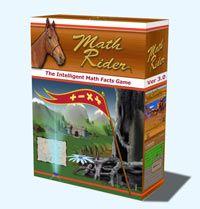
When the opportunity came to review Math Rider, I was cautiously optimistic. The horse part sounded good, but after all our other trials and failures into the world of math fact memorization, I just didn't see how it could be any more effective than the other things we'd tried. Still, it involved horses. There was a glimmer of hope. The program is aimed at children ages 6-12, or older children who still need to master their math facts. The game accommodates up to 8 players. Thomas Brand, the creator of Math Rider, developed the game because his own children were struggling with math.

Wonder of wonders: It has been easy (gasp) to get my girls to practice their math facts. They *like* it. I never thought I'd be able to say that! My math-loving daughter has already made her way through most of the levels on all four operations. My math-hating daughter is taking a slower pace, working on the easy levels first, and getting ready to move on. They have both shown improvement when I've worked with them on their math.

Each operation (addition, subtraction, multiplication, division) has four levels, from "Easy" to "Master." Each level involves a different quest. For example, the "Easy" level involves the rider's mom having the flu, and the rider is told they will have to fix all meals until their mother gets better. The only cure is the Pythagoras Flower, so the rider sets off on a quest to find it. The four quests are the same across the operations, with a different reward for each quest. There are thirty questions, and thirty jumps, for each section of a quest. Each level requires a certain number of points for completion. The Easy level requires 500 points, Medium requires 750 points, and so on. You do have to complete each quest before moving on to a new one, which makes sense. You can't start doing addition and switch to another operation before your current quest is completed.

I signed myself up as a player so I could understand how it works. The game controls are simple, which is a deliberate part of the design - Mr.  Brand did not want to see a child unable to succeed because of the game controls. When you're answering questions, you use the number keys on your keyboard to type your answers in, and then hit "Enter." When you answer correctly, your horse goes over a jump.  If you enter your answer correctly, you hear a note or a "star" sound. If you answer incorrectly, your horse snorts, and you can re-enter your answer. If you hit a key by mistake, you can hit "Delete" and re-enter your answer, as long as you can do it before your horse gets up to the jump. You can pause the game by hitting the Escape (Esc) key, and turn the music on or off by hitting the "M" key.

The program is "smart," so it adapts to each player. Each student practices the problems they don't know as well but not the ones they have mastered. Each time you complete a portion of the quest, you see a screen that shows whether you've answered the questions correctly or not. There are green bars indicating correct answers, and yellow and red bars which indicate slower or incorrect answers. There is a statistics screen where you can see your overall progress.

The program uses Adobe Air, which means it runs on both Windows and Mac operating systems. This was a huge point in its favor, as we use Macs at our house, and so many programs are written for only Windows. You can see the complete list of system requirements here.

What I like:
  • My children enjoy the game, so it's easy to get them to practice math facts.
  • The statistics screen to monitor progress
  • The adaptability of the program to meet the needs of each player
  • The positive reinforcement when they complete quest, telling them they are a "master of addition," etc. 
What I like less (small details, and not ones that would prevent us purchasing the product):
  • Although you can turn the music off, you have to turn it off each time you play a new section of a quest. I would prefer to turn it off, and then opt to turn it back on myself. I did mute the computer, but then I couldn't hear the horse snort when I answered incorrectly.
  • At the end of each section, you have to watch your points count out. I would love a way to be able to skip over that.
My child who "doesn't like math" is simply a child who struggles with it. This game has been so good for her, because she wants to play. What she needs most is consistent practice, and she's getting it now, and I don't have to make her do it. That, I believe, is the key. While I am not always an advocate of more screen time, in this instance, I will make an exception, because I can see how much it's helping her.

Math Rider is available as an instant download for $47, which includes free software updates for life. If you would like to try before you buy, click here for a free 7-day trial.

Click to read more reviews from the Schoolhouse Review Crew!


Monday, March 18, 2013

REVIEW: TouchMath


My little guy turned 5 in August, so even though I would not have sent him to school this year, if we were going that route, we've done some kindergarten work. Overall, it has not been going well. He doesn't want to sit still, and has strong opinions about whether or not he should have to do any school work at all. It's not that he can't do it; he's quick to grasp things, and once he decides to cooperate, it goes quickly. I do spend quite a lot more time getting him to do the actual work than he spends doing it, though.


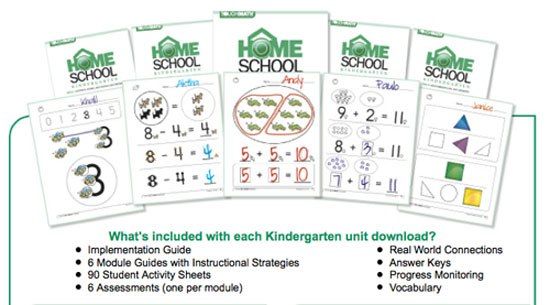
I've been revising my plan over the last few weeks, and felt it was best to pare back to some reading instruction and a little math. When the opportunity came to review TouchMath, I was excited to use it with Isaac. We were both thrilled to receive our box, and quickly got everything out to play. For the purpose of this review, I received downloadable versions of all 4 TouchMath Kindergarten Homeschool modules, A-D. There are 6 units within each module.

  • Module A focuses on Counting, Adding and Subtracting within 5
  • Module B focuses on adding and subtracting within 5
  • Module C focuses on understanding numbers 1-20
  • Module D focuses on measurement, data, and geometry. 
In addition to the core program, we also received the following fun manipulatives to use:  TouchMath Tutor Kindergarten Software, TouchShapes,


and 3-D Numerals. Note: The manipulatives are optional, and not required to use the program.


Isaac *loved* all the manipulatives. We started out with learning the touch points on the numbers, and he caught on quickly. He liked to get them out and practice on his own. He enjoyed using the TouchShapes during the lessons, and liked using them to make pictures on his own. He's always up for a game on the computer, and he liked having a special math game just for him.

"Mommy, is this a rhombus or a  hexagon? Very good, Mommy!"

One of the first things we did was learn to count to 100. I remember practicing this with my girls when they were older than Isaac, so I wasn't sure how it would go, but he caught on lickety-split. I loved how the worksheets had him start counting in a random place and continue from there, or fill in numbers in the middle of a sequence. It made him think about the numbers, and he did very well. 

 Counting to 100 - fun with Cheerios!

As we got a little further, I thought some of the activities were a bit simple. I didn't see why he needed to circle groups of shapes, for example, until I remembered from the teacher training video how crucial it is to connect manipulatives and pictures with the abstract numbers. By circling groups of 2, he is learning to see what a "2" means.


TouchMath recommends using the program for 2 - 2.5 times your child's age, which would be 10-12 minutes per day for my 5-year-old. On a typical day, we would try to work on a set of activity sheets, which were in sets of 2-4 pages in the  Implementation Guide. Sometimes, we got them all done, and other times, we might get through one. He liked the computer software, so I encouraged him to practice on that, and he was almost always willing.

As we began to use the program, I was concerned that I was missing something. I had read the teacher's instructions, but didn't feel I had quite enough information. I confess that I am an anxious math teacher. I went to the website and ordered their free teacher training DVD, even though I wasn't sure I'd get it in time for the review. It arrived via Priority Mail in just a couple of days! I was thrilled with the quick turnaround. I watched the DVD, and it was very helpful. They also included a "Teacher Training Manual," with much of the information presented in it, and practice problems for each thing presented. It was excellent, and I felt much more confident after I'd viewed it.

I have been impressed with their excellent customer service. I had a question about the software, and was able to get an answer quickly. Also, we had an issue with one of our manipulatives, and they sent us another one right away free of charge.

I really, really like this program. I love the statements that children are given to memorize, like "I start on the side with the arrow. The arrow is in the ones column on the right side." Also, for addition with regrouping, they put a box over the next column, and for subtraction, they use a "regrouping bar," which is a line, instead. My girls were often confused with regrouping and would add instead of subtract, etc. Those visual cues are excellent.

TouchMath was created because an elementary teacher saw her beginning math students having difficulty, and wanted to help them. The focus was initially on students with special needs, but has grown into a math program for anyone. I love this quote from their website: "During the next thirty years, our goal is to help banish math anxiety worldwide, whether that anxiety is born of fear, lack of comprehension, or a learning disability." I have a daughter with quite a lot of math anxiety, and I wish I'd known about this program when we were starting our math journey. I think it would have made a huge difference to her.

I've spent a lot of time stressing over math in my homeschooling career, and while using TouchMath, I felt I could teach it successfully for the first time. The way they explained the concepts made so much sense to me, which made it easy to explain to Isaac. I was amazed at how quickly he learned things while using this program.

Product Pricing:
TouchMath Homeschool Kindergarten Modules, A-D: $59.95 each, or $199.00 for all four
TouchMath Tutor Kindergarten Software, $99 
TouchShapes, $30
TouchMath 3-D Numerals, $79

Click to read more reviews from the Schoolhouse Crew!