Pages

Showing posts with label online curriculum. Show all posts

Wednesday, October 22, 2014

REVIEW: Middlebury Interactive Languages

For this school year, I'm doing something we haven't done before: exploring options for online classes. My oldest is in high school now, and there are some areas in which I could use some extra support. I haven't been consistent in teaching foreign language. I couldn't decide what to teach; I took a fair bit of French in college, but I wondered if Spanish would be more useful; I wanted to teach Latin but wasn't sure how I wanted go about doing that; etc. We were recently given the opportunity to review a six month subscription to Middlebury Interactive Languages, and I was excited to try it out. I had my oldest daughter, who is in 9th grade, enroll in their high school French Courses

They offer courses in Spanish, French, German and Chinese, for students in grades K-12. Note that only Spanish is offered for the K-2 grades at this time.


We were a little confused when we first logged in, but once we figured out what was going on, the program was very easy to use. Upon logging in, we saw this screen:


Honestly, I wondered what on earth we were supposed to do, but we did finally notice the little arrow at the bottom right of the screen in the "Up Next" section. 

When you put in your start date for the course, a calendar is automatically set up for you with the lessons all scheduled. Middle school and high school lessons are scheduled 5 days per week, for a total of 90 lessons per semester. 


There is also a Table of Contents, where you can see all the lessons listed. When you click on a lesson folder, it opens up so you can see each part of the lesson. In the semester overview, you are able to see what will be covered in your lessons.


The course begins with an explanation of Student Resources, which walks you through what you need to know about using the course. My daughter and I appreciated the information they provided on typing in accents on the Mac, particularly. That was very helpful. Another useful option is the ability to print each unit's vocabulary list. When you click "Print," you get a lovely PDF file with all the words and the translations listed for you. VoilĂ ! (My recommendation is to print the lists and put them in a notebook, minimally; ideally the student would copy them into a notebook. Physically writing things out makes a BIG difference in retention, in my experience.)


Each unit has 5 lessons, and each lesson incorporates varied activities that help the student connect with the language they are learning. Each day's lesson is a little different, so it's never boring. Students learn vocabulary and grammar, and also a bit about the cultures in the countries where French is spoken. Activities include short videos, listening, reading, writing (typing), and interactive games. The typing activities include filling in blanks with vocabulary words, but also short journal entries. I was impressed with how quickly students are assigned to write a few sentences in French, using what they've learned in the program. Each day's lesson takes up to about a half hour, depending on how quickly the student moves through the activities.


My daughter found the Speaking Labs to be particularly helpful, because you listen to a native speaker pronounce what you're learning and then you record yourself repeating the word or phrase. You can then compare your pronunciation to the native speaker's and see how well you've done. It can be tricky to produce sounds correctly in a foreign language, and this feature shows students where they need the most practice.

From a teacher's perspective, this is an incredibly easy program to use. A high school student logs in independently and works independently.  The program automatically takes them to where they left off when they log in again, so there is no confusion about that. You can easily use this program with a computer or tablet, which makes it portable. There is a grade book which shows you the scores they've received on the work they've completed. 

My only concern about the program, and this applies to most online courses we've tried, is the lack of physical writing assignments. Typing is fine, but physically writing things out helps make an important connection in a student's brain. I have Emma write things in a notebook. I realize there is no way for an online course to grade that kind of thing, but I still think it's important.

I am impressed with this program and think it's an excellent online language course option for homeschoolers. You can purchase courses for $119 per semester. If you'd like to learn more about Middlebury Interactive Languages, click here for some videos about their programs (you will be asked to enter your email address. 

Connect with Middlebury Interactive Languages:

Click to read more reviews from the Schoolhouse Crew!

Thursday, October 09, 2014

REVIEW: Essay Rock Star Personal Statement Writing Course

I have not been terribly consistent in working on my girls' writing. They do written narrations regularly, and I should be working with them on correcting them, but... there tends to be a lot of drama associated with editing, so I have avoided it. Just keeping it real here, folks.

They are taking an online class for literature this year, and it's ] going well, so I was excited to have the opportunity to review the Essay Rock Star Personal Statement Writing Course from Fortuigence. I love the option of online classes. There are just some things I am not comfortable teaching, like writing, and having someone else teach it for me takes the stress out of the situation for both myself and my children. I also like that they receive input from someone besides Mom, all from the comfort of our living room in our pajamas, if we choose.

Lily Iatridis (Ms. I to her students) was a classroom teacher for 10 years, and also taught in Japan and in a private school before switching over to online teaching. She founded Fortuigence as a way to teach one-on-one classes, but still have time and flexibility to be with her family. Her courses are intended for middle and high school students, and most of her clients are homeschoolers.

There are four Essay Rock Star courses available:
You can purchase each course individually for $57, or you can sign up for all four courses for $197. Students receive .125 high school credit for each individual course, or one full credit for completing the entire series.

Each course has students follow the same basic steps:
  1. Course Introduction, Rubrics, and Pre-Assessment
  2. Purpose and Description, Brainstorming
  3. Organizing Ideas
  4. Free Writing
  5. Revision
  6. Editing
  7. Wrap-Up
The online classes are broken down into small, do-able chunks. The goal is mastery, so students work at their own pace through each section. There is a video to watch for each lesson, with some reading, all of which takes about 15 minutes. Ms. I offers an audio-only option if students do better without the visual component, as well as a complete written transcript if reading works best for their learning style. She thinks of everything! Once the student watches the lesson, they go and do their assignment, and then come back and submit it by typing it into the online form.

I chose to have my 14-year-old work through the Personal Statement Writing Course, because the time is coming when she will need to be able to write a personal statement for college applications and other things. I am not comfortable with writing my own personal statement, so I thought it would be a good idea to have Emma work with someone else. She was nervous about submitting her writing sample, and so was I, honestly. When we went through her most recent narrations, I was made aware that I need to be paying more attention to her writing (and her sister's) and wasn't sure what Ms. I would think.

I needn't have worried. She responded with a very nice message stating she could tell Emma was a good writer and she was looking forward to working with her. She has really helped her (and me) through the process of creating a personal statement. She has been nothing but supportive and encouraging to both my daughter and me. I have experienced a fair bit of trepidation over teaching writing, because I wasn't sure I could do it well. Ms. I took all the worry away and made it fun (or at least less stressful) for Emma and me. Whenever we haven't been sure what to do, we sent her an email, and she has responded back quickly with reassurance and clear direction. She is a master at virtual hand-holding.

Emma is still working on her personal statement, and I have seen her confidence increase as she's worked with Ms. I. If you're looking for a homeschool writing course, and an online option would work for your family, I highly recommend Fortuigence's Essay Rock Star program. Your student will gain solid writing skills, and Ms. I makes it as painless as possible–even fun.

Fortuigence offers some great free downloads, which you can access by signing up for their End Blank Page Terror, and Grammar Baseball, an ebook to make teaching and learning grammar more fun. Definitely check them out!
newsletter. They have an ebook titled

Connect with Fortuigence on Facebook, Twitter, Google+ here and here, Pinterest and YouTube!

Click to read more reviews from the Schoolhouse Crew!


Thursday, April 10, 2014

REVIEW: Supercharged Science


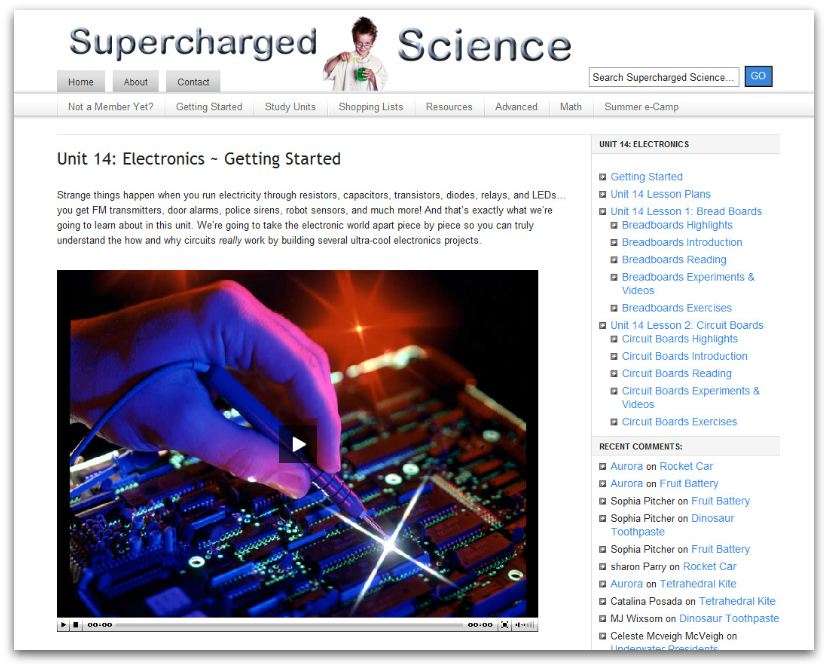
I'm always looking for good science options, so was excited to review the e-Science Learning Program from Supercharged Science. We received a 6-month subscription to the K-12 program.

Aurora Lipper is a real-life rocket scientist with a passion for getting kids interested in science. She started out teaching a group of elementary students about supersonic combustion, then held a science camp, and eventually put together her SuperCharged Science program. She has lots of teaching resources on her site, as well as a homeschool blog, and offers an e-science camp in the summer. She is even available for weekly Q&A sessions on the phone!

There is a TON of information in this program - over 600 experiments! If you look at it all and feel overwhelmed, Aurora has a nice Science Activity and Video Series put together as a place to start. Each one contains five simple experiments with videos explaining what to do.

You can choose to use the e-science program in several different ways: by grade level, by topic, and by interest. You can use it as your primary science program, or as a supplement. They provide "conversion charts" that help you correlate your homeschool science curriculum with the e-Science program. If they don't have a chart for your program listed, they will make one for you if you send them the TOC from your book. (I was excited to see that they offer correlation to Secrets of the Universe by Paul Fleischer, which we used with Ambleside Online last year.)


The topics included in the e-Science Online Learning Program are as follows:
  • The Scientific Method
  • Mechanics
  • Motion
  • Matter
  • Energy (2 units)
  • Sound
  • Astrophysics
  • Chemistry (2 units)
  • Light
  • Electricity
  • Magnetism
  • Alternative Energy
  • Thermodynamics
  • Electronics
  • Life Science (2 units)
  • Biology (2 units)
  • Earth Science
  • Award-Winning Science Fair Projects
  • Mathemagic
They're working on adding even more hands-on worksheets for advanced students, which will be equivalent to college and real-life science work.

We decided to do delight-directed science this time, and selected some I knew everyone would enjoy, even my 6-year-old. All three of my children really enjoyed the experiments we chose. My girls, at 13 and 14, are old enough to try most of them on their own. One fun and simple activity was the Microwaving Soap experiment in the "Solids" section of the unit on Matter. I had never done it before, and it was fascinating to see what happened. I only bought three bars of soap, which was probably a good thing because otherwise I'm pretty sure we'd still be trying different variations! As you can see from the pictures, I had a captive audience.

There is a lot to love about this program. You're intended to do experiments first, then learn the "why" behind them, which is the best way to learn science. Students are encouraged to keep a science journal with their hypothesis and results, which has been a lot of fun for us. There are is something for every age, and you can have all your children working on the same topic with age-appropriate material. I love having the experiments available to use alongside whatever science we have, and it would also be an excellent stand-alone science program. Most of the supplies needed are common household items, and if they're not, links are provided for ordering online. The only real drawback is the cost. The monthly cost is a significant chunk of our homeschool budget, and while science is obviously important, it's not the only important thing.

The e-science Premium Membership is available for $57 per month for grades K-12, or $37 per month for K-8. When you sign up, you're given access to 1-2 levels per month, but if there's a topic you'd like to cover and you don't have it yet, you can just email them and they will get it set up for you. Note: because this is an online program, there are some technical requirements you'll want to check.

If you'd like to see what using Supercharged Science is like, click to sign up to receive a free copy of Aurora's Science Activity Video Series and Guidebook. Also, Aurora is offering a fantastic special: try e-Science for one month for only $1! Click here to find out how to take advantage!

Connect with Supercharged Science on Facebook, Twitter, YouTube, Pinterest, and Google+. Don't forget to check out their blog!

Click to read more reviews from the Schoolhouse Crew!


Tuesday, October 01, 2013

REVIEW: VideoText Algebra

Do you struggle with teaching math in your homeschool? I do. I hate teaching math. There. I said it. Actually, anyone who knows me knows this, as I have been searching for the perfect curriculum that would solve all our math woes since my oldest child was in 1st grade (she's in 8th this year). I can do math, most of the time, but I don't teach it well. I have one way that I understand it, and if the children don't understand it that way, we find ourselves at an impasse. This has not made for a pleasant experience for any of us. I've learned (finally) that I have one child who learns math a little differently than your average bear, and I need to figure out how to help her with it. I've decided that THIS WILL BE THE YEAR in which we conquer the math monster.

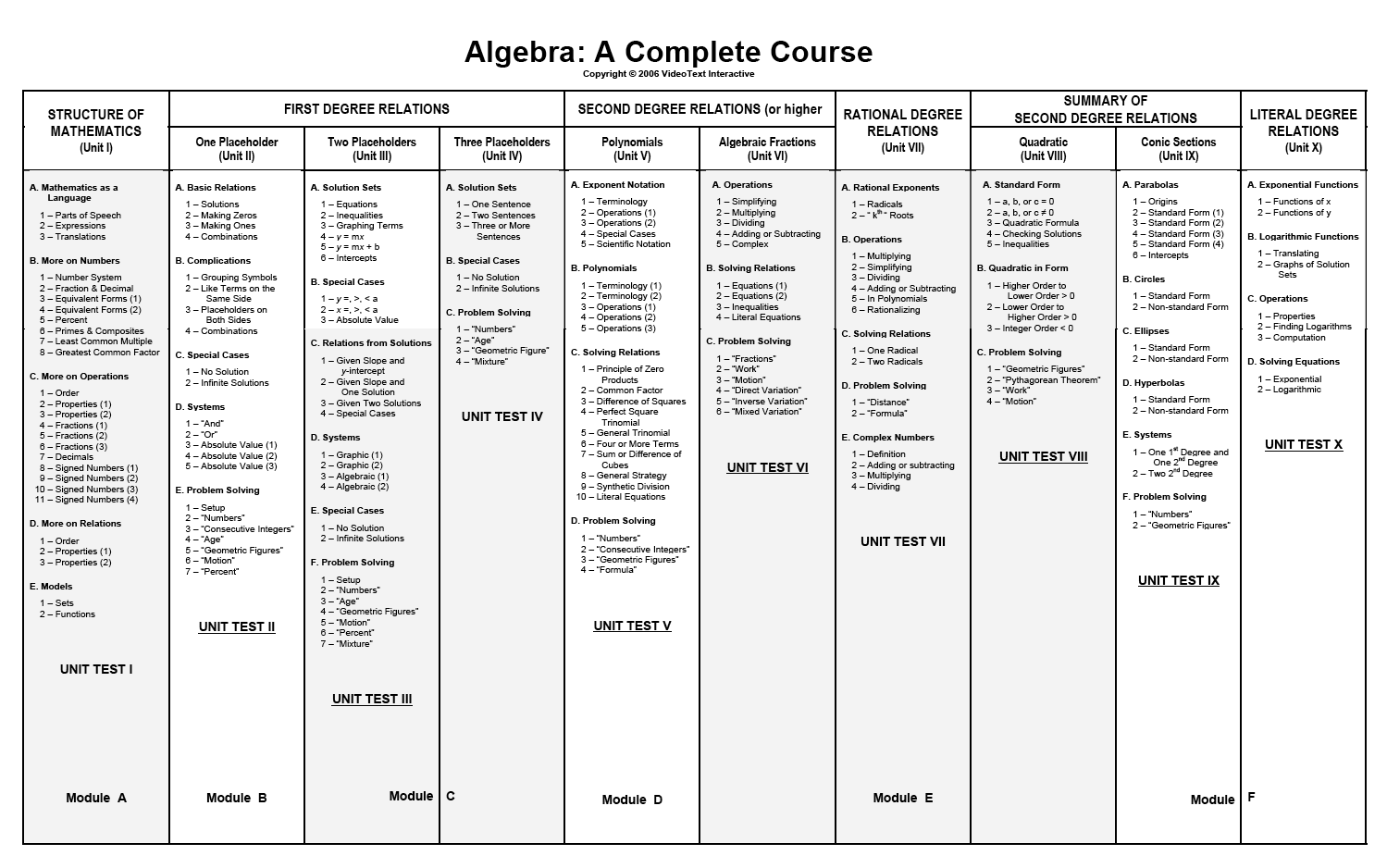
We've been using another program that teaches on the computer, and while my children liked it, I could see that it wasn't giving them enough mathematical depth, if that makes any sense. When I received the opportunity to review Algebra: A Complete Course from VideoText Interactive, I jumped on it. I watched this sample video and learned WHY dividing fractions works the way it does, and I was sold. I did learn to divide fractions when I was in school, of course; I knew how, but never why. It might sound silly, but this was a huge revelation for me!

Each concept is taught through a video lesson, during which the student watches the instructor talking, as well as watching visuals of the concepts as they work through them, which replaces watching a teacher write on a blackboard. It's recommended that you sit and watch at least the first few videos with your student, stopping frequently to ask them about what they're learning and talk with them to be sure they understand. That, right there, is key - having your student narrate what they're learning back to you. Brilliant! I have been watching the videos with the girls when I can, but often I'm hanging out with my 6 year old, so the girls come to me when they are working through their problems for each lesson and we talk then. Each video lesson is 5-10 minutes long, so the lessons themselves are short - a perfect fit for our Charlotte Mason homeschool.


This is not a typical algebra program. When a student completes Algebra: A Complete Course, they can claim credits for Pre-Algebra, Algebra I and Algebra II. They do not use a traditional scope & sequence for teaching the subject; they teach with a mastery approach, going through and re-teaching arithmetic concepts and explaining why things work the way they do, then going on to apply those concepts to algebra.


The folks at Videotext recommend this course in general for 8th or 9th grade students, but if you feel your child is ready at a younger age, you can certainly start them in this program. Take a look at this video to hear Tom Clark, author of the program, explain how to know if your child is ready.

When you log in as the instructor, you have the option to print entire files for each unit, or print them out per lesson. It really depends on how you organize your students. I have one friend who gives her children binders with their daily work, so she puts their worktext pages in that binder, but prints out the course notes and bound them separately. I don't have daily work binders, so I chose to print all the course notes for the entire program and put them in one book, and print out the worktext for Unit 1 and put that in a binder by itself.

Instructor Screen
When students log in, this is what they see:


Obviously, they are not privy to handy things like the answer key. They have links to the video lessons, and the teacher is responsible for printing out any required documents for them. One thing I like is that each time they click on a new lesson, they receive a prompt that tells them to be sure they've taken the quiz for the previous lesson before they begin. That's a handy little reminder for both student and mom!

I'm not going to lie: this has been a challenging program for us. I am faced every day with how much math I've forgotten. I thought pre-algebra would be a breeze, but I'm constantly referring to the answer key to figure out how the questions should be answered, or how something is supposed to work. When they say they don't teach any shortcuts, they aren't kidding, and apparently I learned a lot of them. I am learning things from the ground up, just like they are. I think the best approach is going to be for me to watch each lesson the night before and work through some of the problems. Hopefully by doing that I will be able to help them when they have questions, and sound like I know what I'm talking about, rather than figuring it out on the spot.

My oldest child, who doesn't like math much, is being forced to think, and that is a GOOD THING. I can already tell she's learning a lot from this program. She said to me the other day, "I guess that's why they made me learn all that fraction stuff, eh?" I do think she enjoys the work, because she's finally learning the "why" of math. She never saw the point before, and now I think she's beginning to see.

My younger daughter likes this program very much, because it IS challenging. She likes math, and enjoys working through the problems. I actually had her skip a year in our other math program, because it was too easy, and I knew she'd pick up whatever she needed to know from Videotext. That has proved to be true. Today she learned how to factor, and she picked right up on it and finished her work. She did ask me if it's really necessary to go through all those steps just to simplify a fraction. I told her it is!

This really is an excellent math program, and we're going to continue on with it. It's available from VideoText Interactive for $299, which is a great price for what is essentially three years of math instruction.

Click to read more reviews from the Schoolhouse Crew on VideoText Interactive's Algebra program, as well as their Geometry program.


Tuesday, September 10, 2013

REVIEW: Time4Learning.com


I've looked at Time4Learning many times over the years we've been homeschooling. All of my children enjoy computer games, and I thought it looked like fun. They offer curriculum for preK through middle school, and even have brand new high school levels. Subjects include language arts, math, science (beginning in 1st grade) and social studies (beginning in 2nd grade). You'd need to add handwriting and reading practice. I was excited to have the opportunity to review the 1st grade curriculum with my son, who is 6. For the purpose of the review, I received a 6-month subscription to the 1st grade level to use with him.

I put Isaac in the 1st grade level, because when I read the descriptions of the work required, I thought like he should be able to handle it. However, he had a hard time with some of the initial activities. There was one that required him to hit the space bar when a moving line went across the correct sight word. He didn't know the sight words and was frustrated by the activity, even after I helped him figure out how it worked. The great thing about Time4Learning is, if your child needs to work at a different grade than they're signed up to be in, you have access to one level up and one level down from their current grade. He did fine with 1st grade math, but needed more practice with reading before being able to do the 1st grade reading activities. He did manage some of them, but overall, he was better suited with the kindergarten level in that area.


Isaac has really enjoyed using Time4Learning. He asked often to watch "the blue mouse," and chose which games he wanted to play. I had hoped he would be able to work independently, and as he got more used to how things worked he could to some degree, but since he was in the 1st grade level I did need to sit with him and explain things sometimes. Obviously, that's not the end of the world, but it didn't accomplish what I'd hoped, and that was to keep him busy while I worked with my 2 older girls.

Time4learning offers a lot of great resources for parents. Check out a demo for any level here. You can see an overview of the subjects they offer and how many activities there are per topic. They have printable lesson plans, and you can print a list of completed activities with your child's scores, so you can see their progress.


They also have timer settings. You can choose the minimum length you'd like lessons to be, as well as set a timer for the "Playground," which is an area where kids can play games just for fun. If you set your lesson time for a minimum of 15 minutes, your child must work for 15 minutes before they can get into the playground section.


It's also completely flexible. You can work on things any time, and anywhere you have internet connection. That's a huge plus when homeschooling! It doesn't require having large piles of books around, which I could see helping someone living in a small space or who needed school to be portable. 

One thing I learned from their FAQ, which I thought was worth noting, is that as a curriculum provider, they cannot be accredited, but their curriculum is used by accredited schools. Their printable pages can be included in a portfolio for your student, if you're in a state that requires that. 

As I've mentioned, Isaac had a good time with Time4Learning. I can see this being a good fit for people who work from home, or even away from home, so their children can still be at home too. For us, it's a fun supplement. I love to have him learn while playing games, because it can be tiresome for a small boy to be "told what to do" all the time. I do prefer real books and math manipulatives he can hold in his hands. I want him outside more than I want him in front of the screen. The games are fun, but for us to use this as our primary curriculum would require far too much screen time, in my opinion. 

Time4learning.com is available for $19.95 per month for your first student (PreK-middle school) and $14.95 per month for each additional student. The high school curriculum, which includes 4 courses, is available for $30 per month. For a 9-month school year for Isaac, that would total almost $180. That's really not bad!

Click here to read more reviews from the Schoolhouse Crew!


Sunday, April 14, 2013

REVIEW - Supercharged Science


Have you ever heard of Supercharged Science? I have heard a great deal about this company over the last few years, and have been itching to try their e-Science program. Aurora Lipper, author of the program, has a Master's degree in mechanical engineering, taught as an instructor at Cal Poly State University and worked at NASA on rockets and jets. She is a ROCKET SCIENTIST - for real! She was struck by how bored students were with science, and couldn't understand it - until she learned how most of us are taught about science in school. She set about creating her own lesson plans for science, and after teaching her first lesson to a group of local elementary students with great success, she went on to have a science camp. All this gradually evolved into Supercharged Science - a program that is fun for children and easy for adults to implement.


Aurora's approach is to teach science "from the inside out" - let children do some experiments, see how cool the results are, and then teach what's behind it all once they are hooked and excited to learn more. You don't just throw supplies at them and let them have at it, either. She encourages students to keep a science notebook, and carefully record what they do along with their results. She teaches them how to work with the scientific method and do things correctly. Here is a list of topics covered in the program:

Scientific Method Energy Light Thermodynamics Earth Science
Mechanics Sound Electricity Electronics Science Fair Projects
Motion Astrophysics Magnetism Life Science Mathemagic
Matter Chemistry Alternative Energy Biology


Would you like to see some of the things we did? I knew you would! Let's take a look, shall we?

We started out with the Scientific Method unit, because we've done very little formal science and I don't believe we've ever discussed it. The first thing they did was see how many drops of water would stay on top of a penny before it all splooshed out. Using an eye dropper, they counted the drops as they went along. It was interesting to note that Emma got quite a few more drops to stay on her penny than Abbie did.


After that, we decided to start with Unit 1, Mechanics: Force, Gravity and Friction. We had most of the supplies around the house, so it was a good place to begin. First, we read together the unit overview, vocabulary words, and text, and then I had them do some experiments. First, we looked at magnetism.

I decided that we would look at eletromagnetism using a balloon and a cat. Aurora didn't tell us to do this experiment, I promise, but it was a great deal of fun and we laughed a LOT. (No cats were injured while a balloon was stuck to them.)


Then, we went outside with a compass. I have never used a compass, and wouldn't know how to get myself anywhere with one, but they work because the magnet inside can detect the earth's magnetic field, and it makes the needle in the compass always point to the north. (The experiment was to show us that the earth *has* a magnetic field, not to understand exactly how a compass works.)


We also looked at magnetism in o-shaped cereal. It turns out that if you put some of the cereal in a bowl and stir them around so they have to move away from each other, they attract back together into a group.

Next, we took a look at gravity. This was highly entertaining for me. First, I had the girls jump into the air to see if they would come back down. Guess what? They DID! I had them repeat this a few times to make sure our hypothesis was sound. Then, we tried it with a rubber ball, and learned that, indeed, gravity still worked.

Gravity works! :-)
We moved on to find out whether an object thrown horizontally will fall at the same rate as one that is dropped (it does, much to my surprise), and then did another experiment to see if weight figured into the equation (it doesn't seem to - opposite of what I thought). These were all simple, but we had FUN while we were doing them, and they had to think about what was happening and why. After we did the experiments, we completed the corresponding exercises in their science journals.

The way the program works is this: you sign up for a monthly subscription, which costs $37 per month for grades K-8, or $57 per month for grades 9-12. For the first month, you are given access to the first seven units: Mechanics, Motion, Matter, Energy 1, Energy 2, Sound, and Astrophysics. Each month after that, you will receive access to two more units, in the order given on the website. If you see something else you want to try sooner, you can email them directly and they will give you access. Also, they have conversion charts available that show you how you can use the program in conjunction with several popular homeschool science programs. As you consider signing up for the e-Science program, be sure to read their terms of service (as you would for any other subscription program). They do have a 30-day satisfaction guarantee. If you'd like to try it out before you subscribe, you can sign up for some great free stuff and try it out.

There is a TON of information on this website. It feels a little overwhelming at first, actually. However, once I took a deep breath and started really looking at what was available, I was impressed. I like that there is so much hands-on learning to engage a child. Even the "textbook reading" is very well done - it's written in a conversational tone to the student. Aurora Lipper is passionate about science, and it shows in all aspects of the program. She is also available to answer any questions you may have.

The girls and I *loved* using this program. It really is accessible for all ages. There was a lot that Isaac could do and understand along with us. They appreciated the hands-on learning and looked forward to doing science. This program is a great example of living science and worth considering for your homeschool.

 Click here to read more reviews from the Schoolhouse Review Crew!